
When Did OpenAI Launch ChatGPT Browser Atlas, and What Are Its Features?

OpenAI officially released its new ChatGPT Atlas Browser on October 21, 2025. It brings the full ChatGPT experience directly inside the browser, allowing users to search, chat, and perform actions within one interface. Instead of opening multiple tabs or typing queries into a search engine, you can simply ask the chat panel anything while browsing.
This release marks OpenAI’s next big step toward building a browser that blends web navigation with AI-driven assistance in 2025.
What Are the Key Features of the ChatGPT Atlas Browser?
How Does the Built-in Chat Panel Work Inside ChatGPT Atlas?
Atlas includes a chat sidebar available on every page. You can use it to summarize articles, ask questions about the content, or rewrite text directly on the page. It stays open while you browse different sites.
What Is Context Awareness in ChatGPT Atlas and Why It Matters?
Atlas can understand the context of what you’re viewing. When allowed, it remembers previous pages or queries to give more relevant answers. This helps the browser feel personal and intelligent during multi-step tasks.
What Is Agent Mode in ChatGPT Atlas Browser?
Agent Mode is available for paid users. It allows the browser to perform automated actions such as form-filling, product comparisons, or task scheduling. Think of it as a built-in assistant that can execute small web-based actions.
How Does ChatGPT Atlas Handle Memory and Privacy?
Users can choose to enable or disable memory. When enabled, Atlas stores context, preferences, and browsing sessions for a smoother experience. You can clear memory anytime for complete privacy control.
Which Devices Support the ChatGPT Atlas Browser Right Now?
Atlas is currently available for macOS users. OpenAI confirmed that versions for Windows, iOS, and Android are coming soon.
Summary:
OpenAI launched the ChatGPT Atlas Browser on October 21, 2025, bringing conversational AI directly into web browsing. Atlas allows users to search, chat, and perform tasks in one interface through its built-in chat panel. It features Agent Mode, context awareness, and memory control for smarter, personalized browsing. Available for macOS, it lets users summarize pages, compare data, and perform online actions instantly. Compared with Google Chrome and Perplexity Comet, Atlas blends AI assistance with real-time browsing, setting a new standard for Answer Engine Optimization (AEO) and content interaction in the AI browser era.
Also Read: How to use new Google Wallet in Pakistan, Complete Guide
How Can You Download and Start Using ChatGPT Atlas Browser on Mac?
- Visit the official ChatGPT Atlas webpage on OpenAI’s site.
- Download the installer for macOS.
- Log in with your ChatGPT account credentials.
- Import bookmarks or browsing data if needed.
- Start browsing and use the chat sidebar to summarize or ask questions.
- Manage memory and Agent Mode settings from the options panel.
How Does the ChatGPT Atlas Browser Change the Way We Search Online?
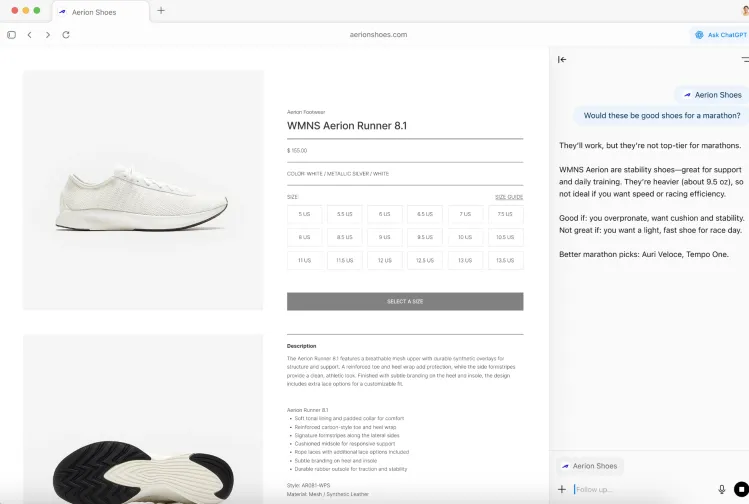
The ChatGPT Atlas browser changes the traditional keyword search model into an interactive chat experience. Instead of typing phrases into a search bar, you can ask questions naturally, like “Would these be good shoes for a marathon?” or “Summarize this page.”
For content creators, this shift means websites must be optimized for Answer Engine Optimization (AEO). Your content should directly answer user questions in clear, concise paragraphs that can be extracted by AI browsers and voice assistants.
How Is ChatGPT Atlas Browser Different from Google Search and Chrome?
Google still focuses on link-based results and featured snippets. ChatGPT Atlas, on the other hand, emphasizes real-time, conversational results within a browser chat panel.
While Chrome directs users to websites for answers, Atlas can generate answers using information from multiple sites instantly. It combines browsing and AI in one place, saving time for users who prefer quick, summarized insights.
How Does ChatGPT Atlas Compare with Perplexity Comet Browser?
Perplexity Comet provides fast, factual responses to search queries. However, ChatGPT Atlas is more immersive; it allows you to interact with pages, perform tasks, and even edit text directly within your browser.
Atlas aims to be an all-in-one browsing assistant, while Perplexity remains primarily a question-answer engine.
What Steps Should Content Creators Take to Optimize for ChatGPT Atlas Browser?
- Write clear and direct answers near the beginning of your content.
- Use long-tail conversational headings that match user intent (for example: “How can I…” or “What is the best way to…”).
- Keep language simple and structured for AI extraction.
- Add schema markup like FAQ or HowTo for better comprehension by AI models.
- Ensure site speed and accessibility remain high.
- Support multilingual content with proper hreflang tags.
How Can You Prepare Your Website for AI Browsers Like ChatGPT Atlas?

Atlas and similar browsers prioritize clarity, structure, and conversational tone. To prepare your site:
- Focus on user intent rather than just keyword stuffing.
- Use heading structures that mimic natural questions.
- Offer step-by-step instructions wherever possible.
- Ensure your site is mobile-friendly and loads fast.
- Review privacy and cookie settings, as AI browsers may handle data differently.
How Can Regular Users Benefit from Using ChatGPT Atlas Browser?
- Summarize long articles instantly.
- Compare information across multiple pages.
- Use the chat panel as a research assistant.
- Enable Agent Mode for automated web tasks.
- Manage memory settings for privacy protection.
Final Thoughts on ChatGPT Atlas Browser Launch
The ChatGPT Atlas browser represents a major evolution in online browsing. Instead of relying on static search results, users can now explore the web through live chat and personalized guidance.
For readers, it means faster, smarter browsing. For content creators, it means adapting content for AI-driven browsers that value precision, speed, and structure.
As OpenAI continues to expand Atlas to more platforms, it’s clear that the future of web interaction will combine traditional browsing with conversational intelligence, setting a new standard for how users find and consume information online.